


A calendar you can read
at a glance.
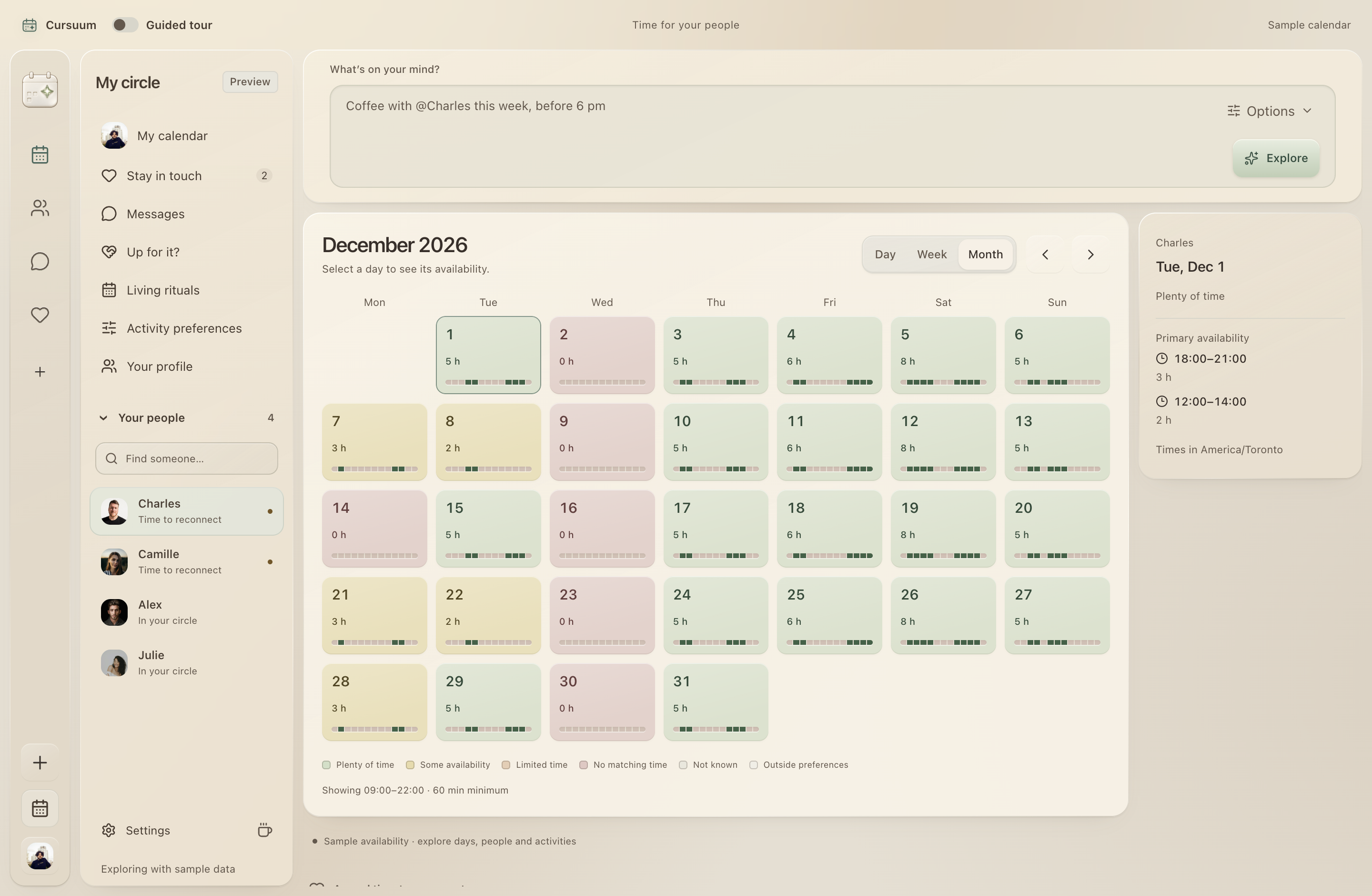
A gentle heat map makes room in the week visible. Green for more time. Yellow for a smaller window. Choose a day to see the hours behind the color.
Time togetherA little roomFull day
A social calendar. Made for your desktop.
Find an activity, time, and place that work with everyone’s schedule and personal preferences.
Cursuum 0.2.36 · Apple Silicon Mac · signed and notarized · access code required
 Camille
 Charles
 You
Friday 13 · 10–11 am
One hour that fits all three preferences.Life already has enough tabs.
Built around real life
Preferences, availability, and trust each have a place. Explore how Cursuum brings them together.
Overlay shared availability, explore possible hours, and keep your people in view.
ExploreWhat is calculated locally, what reaches AI, and which decisions remain yours.
ExploreCalendars, permissions, sharing, and deletion: clear answers about your data.
ExploreA useful free foundation, then AI assistance as you need it. Plans in Canadian dollars.
ExploreOur product approach, the disciplines we value, and our current hiring status.
ExploreIt starts with something you’d like to do.
Choose your people, explore their preferences, and find a compatible time. Change the people, activity, or hours to see the plan adjust.
Outdoor tables, pancakes, and a short walk afterwards.
Good espresso, quiet cafés, and a park nearby.
Vegetarian options, morning coffee, and relaxed conversation.
These tastes describe the sample people. The example below compares their free time with your chosen hours and duration; it does not search real places.
10:00–11:00
Café North StarFictional place
Illustrative schedules and fictional places. No calendars connected, venue search, bookings or invitations.
A gentle heat map makes room in the week visible. Green for more time. Yellow for a smaller window. Choose a day to see the hours behind the color.
Keep the people who matter in view. Tell Cursuum what you like doing together and how often you want to reconnect. Opt-in relationship reminders give you a gentle daily nudge, including after quitting when background activity is enabled.
CharlesA coffee would be niceCamilleAlways up for a walk AlexMake room for a good dinner
Sample data · Charles’s portrait used with permission; other portraits from Unsplash
Your time, on your terms.
Good plans start with when you’re free and when you like to do things. Cursuum brings availability and activity time preferences together, while keeping private calendar details separate.
What you choose to shareFree time windows within your chosen hours and sharing period.
When you like to do thingsSet preferred times for activities, alongside your availability.
What stays privateEvent titles, guests, locations, and notes.
What you controlYour sharing hours, expiry and revocation. Signed-in people with your code can see the shared windows.
Calendar connection is optional. This website preview uses sample data.
Make room in your own way.
An administrator-issued code unlocks Free access. Subscribe in the Mac app: CA$8/month for Plus or CA$18/month for Pro, plus applicable taxes. Renews monthly; cancel renewal in Settings.
A little room for your closest people.
CA$0Ongoing Free access by invitation.
For making plans a little more often.
CA$8Per organizer / month · friends participate free · before tax
For the plans with more moving parts.
CA$18Per organizer / month · friends participate free · before tax
Privacy, export, deletion, basic chat, and calendar views are never reserved for paid plans.
A simple AI request uses 1 credit; an advanced request uses 5, shown before use. Failed requests are refunded. No automatic overage charges.
A thoughtful first five minutes.
Sign in with Google or email and password.
Redeem your emailed access code after sign-in, then choose manual availability, local matching and your preferred theme.
Connect Google Calendar, select events from a local calendar file, or add availability manually. You can also skip this step.
Google sign-in and optional calendar setup are available in the native app. Creating or editing an event in a Google calendar you own requires a separate permission and a review before saving. The Apple Silicon preview is signed and notarized. Google’s public calendar review is still pending, so calendar access may be limited. Manual availability and local imports work without it.
The installed app is available for Apple Silicon Macs. You can try the interactive demo in your browser with fictional people and schedules.
The Mac app, website and interactive demo support English, French, Simplified Chinese, Spanish and Japanese. Choose a language in Settings; the Mac app remembers it on this device. Cloud assistance is requested in your selected language, and your account language is used for authentication emails. Access invitations use the recipient language chosen by the sender. Provider and operating-system interfaces follow their own language settings.
Open Appearance in the sidebar or in Settings. On a narrow screen, use the appearance button in the top bar. Choose Light, Coffee, Dark or Traditional, then turn Hairline grid on or off. Traditional has a white calendar with blue selections. The app remembers your choice on this device.
In Mac 0.2.31, Personal, Social, School, Academic and Professional workspaces offer separate layouts, custom calendars and weekly events. Course and project filters change the view, not saved events or busy time. Event details stay in encrypted local storage. Availability synchronization sends only busy times and device/synchronization metadata, not titles or notes. The service can read those times; this is not end-to-end encryption. This does not write events to Google or another calendar provider. The app distinguishes local saves from pending, failed and completed availability updates.
Sign in, then redeem the access code sent to your invited email address. An invitation can grant ongoing Free access or a time-limited trial of Plus or Pro.
Your interest stays private unless you both choose the same activity for each other. Once it’s mutual, Cursuum can show up to three times that fit the availability and activity preferences you’ve shared.
When updated shared availability no longer supports a sent suggestion, it’s marked for review. The original stays visible while you compare alternatives. Backing out keeps it. Confirming a replacement sends the new time to the other person. It doesn’t create a calendar event.
Use Think deeply to compare eligible times and try a different duration or week. You can undo an experiment. An empty result means the shared schedules and preferences don’t establish a suitable window.
A sharing code gives access to selected free times and any activity preferences you include. It doesn’t include event titles, notes or guests. You can revoke a code to stop future access. Messages and mutual-interest suggestions are processed by the service and are not end-to-end encrypted.
No. This website uses sample availability. In the native app, you can connect Google Calendar, import selected events locally, or add your own time windows. Friends can share free windows through a Cursuum availability code; event details stay private.
Yes. Calendar setup is optional. Add time windows manually, import selected events from a calendar file, or explore first. Google sign-in does not grant calendar access. Calendar connection and event editing have their own permission steps.
Yes, from the Mac app after signing in. Review the monthly price, taxes and terms before paying through Stripe. Plus includes 100 AI credits per billing month; Pro includes 500 and advanced planning. Google calendar public approval is still pending. Free local matching does not require AI or payment.
Open Messages to start a conversation or join one using a conversation invitation. Sharing availability and joining a conversation are separate choices.
Reminders require an awake Mac. Enable reminders and macOS notifications, and turn on background activity if you want checks to continue after closing the main window.
Open Help for sign-in, calendar, and billing questions. The Encryption page shows what stays on your Mac, what reaches a service, and what another person can see.
Mac versions after 0.2.23 include an experimental Learn from my choices setting. It is off unless you turn it on in Settings. It only reorders times that already fit the shared availability, using the times you choose and feedback such as “usually too late”. Everything runs on your Mac: a small model included in the app, checked before use, with no GPU, server or download. If your Mac is busy or slow, Cursuum uses a simpler on-device method instead, and Settings shows which one is active. Your history is stored encrypted on your Mac for at most 180 days and is not sent to Cursuum. In group plans your history counts for only part of the order. Turning it off or resetting it deletes what was learned.
Living rituals help a group keep a shared rhythm with agreed activities and alternatives. Each person chooses an existing availability-sharing scope and agrees to participate. Cursuum processes private flexibility choices to find common options; other participants do not receive those settings. Optional rare-window notices cover only the period checked, and groups can agree to rotate whose preferred time comes first. Every occurrence needs confirmation from everyone. Nothing is booked, moved, or sent automatically.